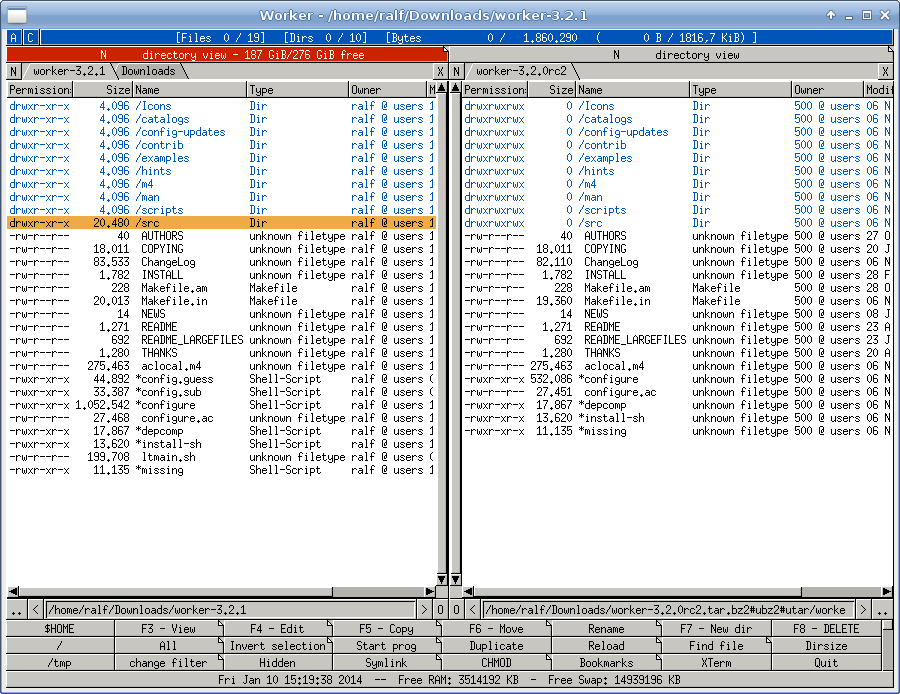
These types of file-managers are called 'Orthodox file managers'. [1]
In answer to your question of which was the first, the answer appears to be PathMinder (1984) and Norton Commander (1986). Both were for DOS so it seems to be an original innovation from the DOS world. Directory Opus first came out in 1990.
I wasn't familiar with PathMinder before looking at the wikipedia article but I was familiar with Norton Commander, as I think nearly everyone who used DOS in the late 80s would be. I personally favoured XTree (1985) more. Xtree didn't originally have the two pane view, but added it in 1989.
"Double Commander (https://doublecmd.sourceforge.io/) is a free cross platform open source file manager with two panels side by side. It is inspired by Total Commander and features some new ideas."
> _Once you get used to two panes, it's hard to go back._
Just as a data point, I tried that and I never could figure out how to populate the left pane and the right pane in such a way that it was helpful. (I.e. that copy and move did the right thing.) It just felt pointless to me.
I've used vifm a few times, but only after figuring out how to turn off the two-pane split :-)
In the days of applications with no concept of standard file dialogues, running on single-tasking operating systems, for platforms where disc media were sold unformatted, and needed low-level formats, it really was.
Being able to format a floppy disc and continue to do things on OS/2 without applications becoming seriously jerky was also a feature. (-:
CentralPoint PC Tools seems little remembered nowadays. It was quite an extensive toolkit, as I recall. File viewers for various types of database/spreadsheet/wordprocessor files. Disc and file hex editors. Repair utilities. Extended directory change. A uniform look and feel, and a fairly good manual.
> CentralPoint PC Tools seems little remembered nowadays.
Indeed, up to the point that the name was usurped by some unrelated software.
It was very useful even in the later DOS era; it was a standard part of my travelling tech toolkit. It had one of the fastest floppy formatters around, and just about the fastest DOS disk-defragmenter I ever saw, nearly an order of magnitude quicker than Norton's.
The PC Tools backup/restore tool was also superb and extremely fast. It used an extended disk format, squeezing about 1.6 MB onto an HD 3½" floppy, and compressed data on the fly, so many megabytes of software or data could be squeezed onto the minimum number of floppies.
What doomed Central Point software is that it did a licensing deal with Microsoft. Cut-down versions of PC Tools Backup and the separate Central Point Antivirus were bundled with MS-DOS 6. Microsoft promised CP that CP would make money from DOS 6 customers wishing to upgrade to the full versions.
In actual fact, people got by with the freebie versions and CP's sales of standalone products _and_ upgrades both stagnated.
MS tried similar tactics on STAC in the hope of bundling the Stacker disk-compression tool with MS-DOS 6. STAC, wisely, said no.
So Microsoft just stole the code and used it anyway.
It used the money wisely, to diversify the company out of disk compression by acquisition, buying vendors of remote-control software (ReachOut) and enterprise backup (Replica).
Sadly, this was long before ubiquitous Internet connectivity, even by dial-up modem. ReachOut mainly worked by direct-dial modem-to-modem comms -- useful, but expensive, as each machine to be controlled needs a modem, a telephone line and its own phone number.
It wasn't enough and STAC ended up going broke. Central Point Software was bought out by Symantec, like Quarterdeck and Norton and others.
MS-DOS 6 was badly buggy anyway and MS had to release a free update, MS-DOS 6.2. (Note, at this time, product updates, service packs, etc. were extremely rare.)
Then, when it lost the STAC lawsuit, it released another update, MS-DOS 6.21, which simply removed disk compression altogether.
Then MS rewrote the offending code and released MS-DOS 6.22, another free update, replacing the infringing "DoubleSpace" with "DriveSpace" -- basically the same tool but with different compression/decompression routines.
This was the last-ever version of MS-DOS, and thus DOS 6 has the dubious distinction of being the most-patched release in history.
There are details of this on Wikipedia but it's been sanitised by MS PR so it merely mentions patent infringement, rather than the direct code theft involved.
I can't believe DOS Navigator [1] is not mentioned - true MDI in TUI using Turbo Vision. Ran circles around Norton Commander. Even had a freaking spreadsheet built-in!
for the current windows platform there is far manager: https://www.farmanager.com/ Unlike Norton it has plug-ins and there are a lot of them available.
Counter data point here. NC/VC since 90-ish, TC, MC, Far. Then suddenly it all lost fit and explorer/finder felt much better, with many windows and quick access pins. Explorer still lacks Finder’s inplace folder expanding, but that’s bearable.
Idk what happened exactly, but now I can’t stand commanders at all.
Fixing the number of panes at 2 seems a little arbitrary. I used dired in emacs and open precisely the number of panes I want: most of the time 1, fairly often 2, once in a blue moon 3, and I've never needed 4.
I've used it as a replacement for Total Commander on the Mac.
Another posted posted Marta, which I just downloaded and it seems to have almost the same features as Total Commander but in a free/open source offering.
Double Commander seems to be the most popular and featureful among cross-platform two-panel managers. However, its integration with the rest of the system is rather lacking on Mac.
Forklift made some questionable choices in the version 3. The app became much slower.
No, Meta Vision is a YC startup doing the headsets you see on their site. Metaio was doing AR for phones and things (and I think were bought by Apple).
It is; and the PureView 808 (Symbian) has had that before. But even though the full-resolution shot is saved for post-processing you usually get a 5- or 8MP shot that's your actual final image.
Janty has had something similar for a while, their Mid series. Hook it up to USB and you can program it in all sorts of ways, save/load profiles, change the puff LED colour to any RGB value, etc. It even has a joystick(!). http://www.janty.com/en/mid-series
Been going at it for a couple years now with consulting and freelancing. I've finally gotten good at hitting my estimates. What worked for me was to keep strict time of everything (shoutout to toggl.com, love it!), so I could learn from my mistakes.
The trouble is now though, my competition seems to be underbidding me, but in reality they're providing those ~33% estimates they will never realistically keep, while I'm at ~100% estimates. Not really sure how to relay that to clients. One of the many reasons people like me need a salesperson in front, I guess.
You're probably losing more business than you think - customers have no idea who is accurate or who is just faster, etc. They will generally go with the lowest quote regardless of other factors unless they've been burned before multiple times. Most people haven't.
I don't have a solution here though other than noticing that underbidding and then getting skilled at convincing clients to do paid extensions later actually appears to make the most money at the cost of your ethics. I'd avoid that approach, but it does seem to work for a lot of companies.
My personal approach is to quote for very bare projects with only the bare essentials (eg, poor UI design, minimum possible feature for the client to see what they're asking for, etc). This can usually be done a lot cheaper than most people think as 90% of the work is in the last 20% of the features. Then once the client has something, you can give them a quote to touch up the parts they need. Basically you split the project up into many small projects each with their own quote which helps you to estimate tasks as they appear and helps your client to minimize costs by leaving off features that are more expensive than they initially appear.
The other side of that coin is that often the clients I get via referrals have no reasonable alternatives. They often have done all business through referrals and so the alternative to me is the open market which is intimidating and has a significant barrier to entry. The end result is that we build a solid and stable client relationship that generally only gets upended if/when money runs out.
It's a great position to be in, provided you have the throughput to expand to other clients and aren't dependent upon a single client for income.
What worked for me was to keep strict time of everything (shoutout to toggl.com, love it!), so I could learn from my mistakes
Right, that was part of my method as well. I learned to keep really good notes of each part of the project. At the end of each project, I compared my "what I thought it would take" with "what it actually took". In subsequent projects, I tried to match up similar complexity items with "what it actually took" notes to remind myself of the pain.
Same! And I'm sure the reason it didn't take that long with getting good at it, was it hurts like hell when you do the 33% thing on a couple large projects, when you're on your own.
If you're really good at estimates, try to play that you can keep not only the final delivery, but also the partial ones. Something like "you can be sure I'll get 100% done because you can check when 10% is going to be done". Sure it's not a guaranteed sale - and it's harder to keep both partial estimates and totals, comparing to only totals - but it's still something.
Good luck. I found myself in a similar situation with pretty good estimates, but unable to bid low. I'd be bidding double or triple the competition. One time, I was bidding at triple, and the previous dev had failed totally. They went with another dev who bid nearly the same price. He failed, too. By that time, I was like, I'm not even going to bother - they don't want to pay what it takes, and buy failure over and over.
It's common in the fixed-bid world to deliberately underbid and charge exorbitant rates for the inevitable change orders. There's an opportunity to compete there, but maybe not an easy one.
Maybe it's due to the phrasing of the question. I certainly prefer native (ok semi-close-ish native, I use Titanium), but I _will_ in the future prefer to be using HTML5, once it's ready.
HTML5 isn't ready yet in my opinion, as it takes too much effort (read: hours, money) and many workarounds to get a polished, fast and responsive app out of it to rival native. Sure it's awesome for fast prototyping, but it's still too hard to get "dat native feel".
I'm curious in how you put Titanium next to PhoneGap (Disclaimer: I may be reading too much into that, or not understanding your meaning - 2nd language etc.).
My experience with Titanium is that you code in js or Alloy, then when building and deploying, you get native code, with native elements and everything.
Comparing it to PhoneGap, which purely runs in a slowish WebView isn't quite fair I think. Or has your experience been different?
You are absolutely right: It's been a while since I last used Titanium. At the time you had to use a crappy/buggy UI to compile your app, with random bugs ocuring all the time, not being able to build once you've upgraded to a newer version due to backwards incompatible changes and more weird incompatibility bugs with other versions of XCode, and so on. I hated the experience since I couldn't rely on being able to building my app and Objective C library support wasn't available at the time or didn't work very well. I quitted using Titanium once they switched from their own buggy UI to Eclipse for building, my code was backwards incompatible, the UI couldn't compile to older versions of Titanium, I had enough. It's true, it has better performance as say a Phonegap, but it did have some weird layout issues from time to time which were hard to fix. Overall I think it's a nice product for creating an app without learning Objective C but I won't use it for a clients app any more, too unreliable.
Oh, and yes, it is 'cross-platform', except for the fact that there are so many things not working on Android (either bugs or non supported in the API for Android) that you need a seperate build for android to make it reasonably useful.
This is al based on my experience with Titanium Mobile from around 2 years ago, so it might be better now.
I think you're right to make this distinction. Titanium doesn't belong in the 'wrappers' family and would be better grouped with other 'cross-platform native' solutions like Xamarin [1], perhaps a 4th category in parent's list.
Titanium is still not quite the same as Xamarin. Xamarin cross-compiles to fully native code from my understanding. Titanium, on the other hand, has JavaScript-to-native bindings i.e. a TiView is a JavaScript object which proxies UIView on iOS.
All business logic is still running in JavaScript. In fact, Titanium spins up a V8 engine just to run your app. This may be fine for the most simple apps, but if you need to kick off a long running operation to a background thread, for example, you're in for some gymnastics.
I'd rather have Grand Central Dispatch, CoreGraphics, CoreAnimation, etc. all at my disposal. Using Titanium felt very restrictive. Their API is a one-size-fits-all between iOS/Android/etc. As soon as you want to step out of that least common denomination, you've got to write native modules. Which, if the people on your team don't know native development, can be a problem.
Have you got experience with Titanium? How is it? I've had a few clients inquire about mobile applications as of late and I'd like to start exploring options for me as a web developer.
There's a slight learning curve, but it's overall very nice to work with. Been making a living from it for a year now, so I'm rather comfortable with it.
You have to get in a kind of different mindset than with HTML, where you use div's for everything - here you create windows and views - but shouldn't take more than a couple days to get dangerous with it :)
There's a few quirks though - differences between iOS/Android for a small number of things, when coding, which can take up a lot of your time to troubleshoot.
An example of such an issue can be on Android, an imageView which you've applied rotation to, suddenly appears to be not rotated, if you put a backgroundColor on it as well as rounded corners. The fix here could be to use a regular view instead, and use a backgroundImage. Thankfully those kinds of weird things aren't as plentyful any longer, the company behind, Appcelerator, are in my experience pretty helpful and fast with bugfixes.


Edit, a source, well, says 4 leaks: https://www.bloomberg.com/news/articles/2022-09-29/sweden-sa...